We buy everything we review ourselves — brands don't send us freebies or influence our opinions.
When you shop through our links, we may earn a commission at no extra cost to you. That's what keeps SRVogue honest and running.
How to Change Safety First Ear Thermometer from Celsius to Fahrenheit

Table of Contents
It’s usually the worst possible moment when you notice it. The baby is burning up, it’s gone midnight, you grab the thermometer — and the reading comes back as 37.8. You stare at it. Is that high? Is that fine? You can’t remember whether your thermometer is set to Celsius or Fahrenheit, and right now your brain is refusing to do the mental conversion. Then learn here that how to change safety first ear thermometer from celsius to fahrenheit.
If that situation sounds even slightly familiar, you’re not alone. Learning how to change a Safety First ear thermometer from Celsius to Fahrenheit is one of those small things that sounds straightforward until you’re actually standing there in the dark pressing buttons and getting nowhere. The instructions that came in the box are long gone, the model number has worn off the back, and the internet is full of guides that describe a button that doesn’t seem to exist on your particular unit.
This guide covers the actual process — clearly, step by step — for the most common Safety First ear thermometer models.
Before You Start — Identify Which Safety First Model You Have
Safety First (also sold under the Safety 1st brand) has released several versions of their ear thermometer over the years. The good news is that the Celsius to Fahrenheit switching process is nearly identical across all of them. The two things that vary slightly between models are which button does the toggling and whether the thermometer needs to be on or off when you press it.
The most widely sold models — the Quick Read Ear Thermometer, the Advanced Ear Thermometer, and the Multi-Use Talking Thermometer — all use a variation of the same method. If your model isn’t listed here specifically, follow the standard method below and it will work for the vast majority of units.
Check the back of your thermometer for a small button, a recessed switch, or simply note how many buttons appear on the front. That’s the key detail.
How to Change Safety First Ear Thermometer from Celsius to Fahrenheit — Step by Step
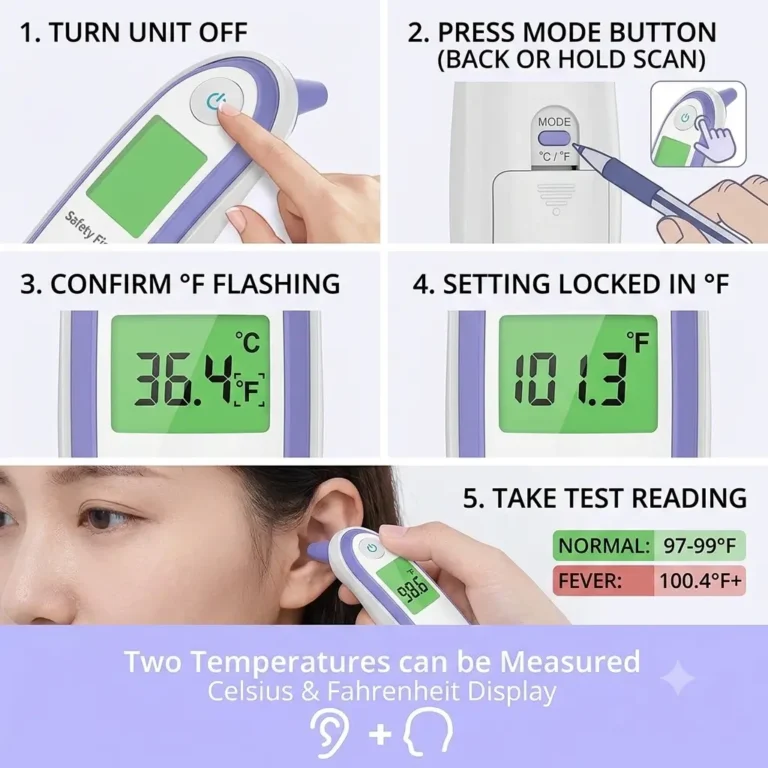
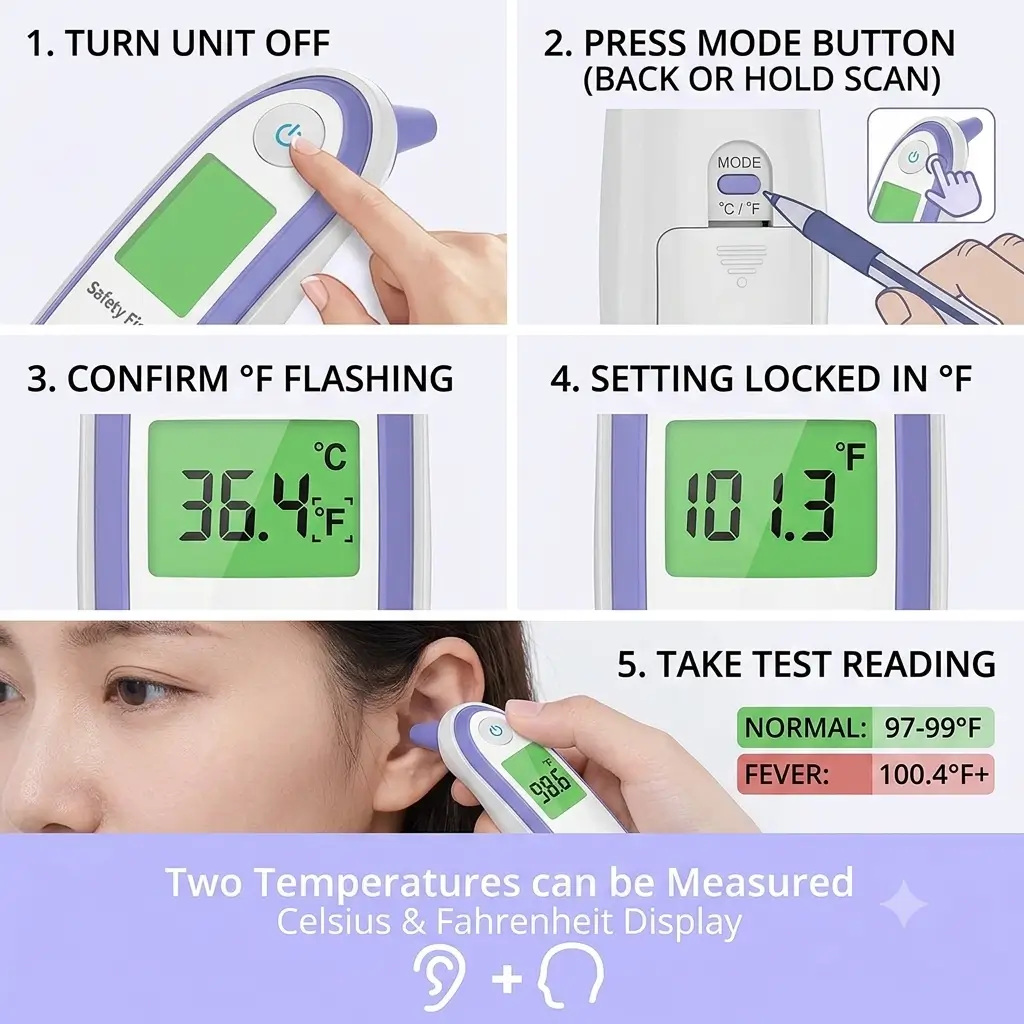
Step 1 — Make Sure the Thermometer Is Switched Off
Before you do anything else, confirm the device is off. The display should be blank. If it’s still showing a reading from a previous use, press the power button once to turn it off and wait a few seconds for it to fully power down.
This step matters. On most Safety First models, the unit needs to be in the powered-off state for the temperature mode switch to register correctly. Trying to toggle it while it’s on or mid-reading often does nothing.
Step 2 — Locate the Mode or °C/°F Button
Look at your thermometer carefully. Depending on your model, the toggle button will be in one of two places:
Option A — Dedicated °C/°F button on the back or side. Some Safety First models have a small recessed button on the back panel labelled °C/°F or simply MODE. It may require a pen tip or similar to press. This is the most direct version — one press switches the unit.
Option B — Hold the main scan button. On models without a dedicated mode button, the temperature toggle is accessed by pressing and holding the large front scan button (the one you press to take a reading) while the unit is powered off. Hold it for approximately five seconds until the display briefly flashes.
If you’re unsure which option applies to your unit, try Option A first — press any small recessed button on the back and see if the °C or °F indicator changes on the display. If nothing happens, proceed with Option B.
Step 3 — Press and Hold to Toggle
Once you’ve identified the correct button, press and hold it for three to five seconds. You should see the display briefly illuminate and switch between °C and °F. On most models, the current mode symbol (°C or °F) appears in the top corner of the display.
If the display doesn’t light up at all when you press, check that the batteries haven’t run low — a weak battery is often the real reason the toggle appears not to work.
Step 4 — Confirm the Setting Has Changed
After pressing, power the thermometer on normally. Before taking a reading, look at the display for the °F symbol. It should now appear in the corner where °C was previously showing.
If it still shows °C, repeat the process — hold the button a fraction longer this time, around five to six seconds rather than three. Some units require a slightly longer press to register the change.
Step 5 — Take a Test Reading
Take a quick reading from your own ear or the inside of your wrist. A normal adult ear temperature in Fahrenheit sits between 97°F and 99°F (approximately 36.1°C to 37.2°C). If the reading falls somewhere in that range, you’ve confirmed the switch has worked and the unit is reading correctly.
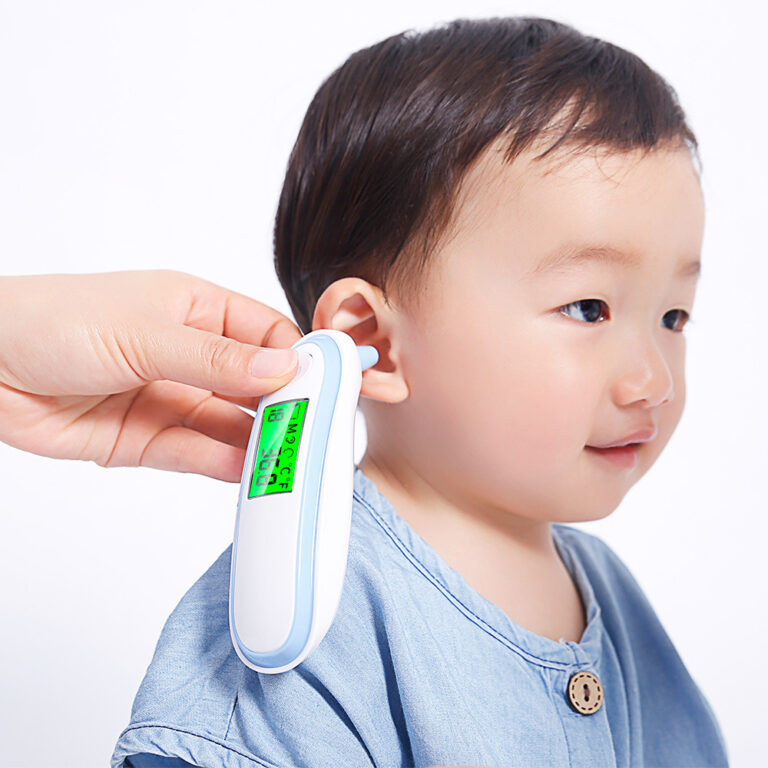
Normal temperature for a child in Fahrenheit via ear thermometer is between 97°F and 100.4°F. Anything above 100.4°F (38°C) is generally considered a fever, though always check with your child’s doctor if you’re uncertain.
What If It Keeps Switching Back to Celsius?
This is a common frustration and it usually comes down to one of two things.
The batteries need replacing. When battery power drops below a certain level, some Safety First models reset their settings each time the unit powers off — including the temperature unit setting. Replace the batteries with fresh ones and then re-toggle to Fahrenheit. The setting should stick from that point.
The hold wasn’t long enough. If the press duration was slightly short, the unit may have registered a partial press and not committed to the change. Try again with a firm, deliberate hold of a full five seconds and watch for the display to flash before releasing.
In rare cases, a unit that repeatedly resets is showing early signs of internal fault — usually from a failed battery contact or minor circuit issue. If new batteries don’t fix the problem, a replacement unit is likely the most practical path forward given the low price point of these thermometers.
Understanding Normal Temperature Readings in Fahrenheit
One reason people switch their Safety First ear thermometer to Fahrenheit is simply that they grew up using it and Celsius readings don’t immediately register the same way. A reading of 38.5°C requires a mental step to interpret. A reading of 101.3°F lands instantly.
Here’s a quick reference for ear thermometer readings in Fahrenheit:
96°F – 97°F: Below normal. Can indicate the thermometer wasn’t positioned correctly in the ear canal, or rarely, a low body temperature worth monitoring.
97°F – 99°F: Normal range for most adults and children.
99°F – 100.3°F: Low-grade fever. Worth keeping an eye on, especially in young children.
100.4°F and above: Fever. In infants under 3 months, any reading at or above 100.4°F warrants a call to your doctor promptly.
103°F and above: High fever. Seek medical advice, particularly for children under five.
Always use ear temperature readings as one indicator alongside how the person is feeling, their behaviour, and other symptoms — not in isolation.
Frequently Asked Questions
Why does my Safety First thermometer show °C when I bought it in the US?
Most thermometers are manufactured for global distribution and default to Celsius at the factory. Retailers in the US typically sell them as-is without changing the default setting. Switching to Fahrenheit using the steps above takes under a minute.
Is the button on the back a reset button or the °C/°F toggle?
On Safety First ear thermometers, the recessed button on the back panel serves as the temperature unit toggle, not a factory reset. Pressing it switches between °C and °F only — it doesn’t wipe any other settings or stored readings.
My thermometer doesn’t have a button on the back. What do I do?
Your model uses the scan button hold method. With the unit powered off, press and hold the main scan button (the largest button on the front) for five seconds. The display should flash and toggle between °C and °F.
How do I know if my thermometer is reading correctly in Fahrenheit?
Take a reading from your own ear. A healthy adult should read between 97°F and 99°F. If the reading seems wildly off in either direction, check battery level first, then ensure the probe tip was seated properly in the ear canal during the reading.
Can I switch it back to Celsius any time?
Yes. The same process toggles in both directions. Hold the mode button again (or hold the scan button while powered off) and it will switch back to °C.
My thermometer shows “Lo” or “Er” — is that a °C/°F issue?
No. “Lo” typically means the reading was below the measurable range (the ear canal wasn’t sealed properly during scanning). “Er” is an error code usually caused by moving during the reading or a probe issue. Neither is related to the temperature unit setting.
Do I need to recalibrate after switching units?
No. Switching between Celsius and Fahrenheit is purely a display conversion — the thermometer’s internal sensor measurement doesn’t change. No recalibration is needed.
Final Thoughts
Knowing how to change a Safety First ear thermometer from Celsius to Fahrenheit is one of those genuinely small things that removes a source of unnecessary stress when you actually need the thermometer most. The process takes under a minute, and once it’s done it stays done — as long as your batteries stay healthy.
If you’re going through this at two in the morning with a worried mind and a sick child, I hope this guide got you where you needed to be quickly. Bookmark it for next time — because there’s almost always a next time.
This guide covers general instructions applicable to most Safety First ear thermometer models. For model-specific guidance, refer to your original product documentation or contact Safety First customer support directly.
if you want to read more reviews about other products, Portable Car Air Humidifier is the best one.